Kotlin Coroutines & Channels: Zero to Hero
Kotlin provides only minimal low-level APIs in its standard library; async and await are not keywords and are not part of the standard library. kotlinx.coroutines is the rich library (launch, async, and more). Kotlin's suspending functions give you a safer, less error-prone abstraction than futures and promises. This guide covers the core features with examples—from basics to channels and select.

Dependency: Add kotlinx-coroutines-core (see the project README). On Android, add kotlinx-coroutines-android. Course structure: 6 modules + bridge examples + capstone. Each module has a Concept, a Code Example, and a Challenge. Start with Module 1, copy the code into IntelliJ or Android Studio, and try the challenges.
What are Kotlin Coroutines?
To create applications that perform multiple tasks at once (concurrency), Kotlin uses coroutines. A coroutine is a suspendable computation that lets you write concurrent code in a clear, sequential style. Coroutines can run concurrently with other coroutines and potentially in parallel.
On the JVM and in Kotlin/Native, all concurrent code runs on threads, managed by the OS. Coroutines can suspend their execution instead of blocking a thread. One coroutine can suspend while waiting for data while another runs on the same thread—effective resource utilization.
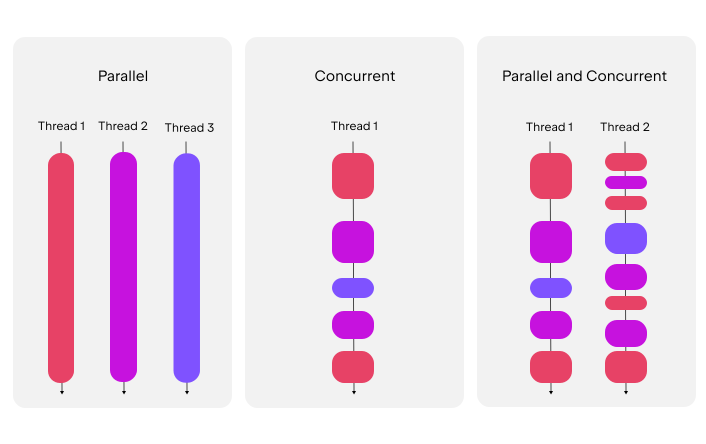
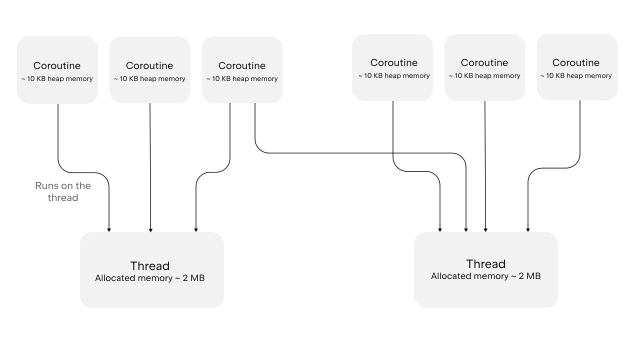
Unlike many other languages, async and await are not keywords in Kotlin; the suspend abstraction is safer and less error-prone than futures and promises. Think of coroutines as lightweight threads: you can run many of them without the overhead of real threads—they suspend instead of block.
Why use them?
On Android and in backend services, blocking the main or worker thread is a sin. Network calls, file I/O, and database access must not block. Coroutines let you write clear, linear code that runs efficiently: start a network request, suspend until the result arrives, then continue—all without callbacks or complex threading.
Suspending functions
The most basic building block of coroutines is the suspending function. It allows a running operation to pause and resume later without affecting the structure of your code. Declare it with the suspend keyword. You can only call a suspending function from another suspending function. To call suspending functions at the entry point, mark main() with suspend (or use runBlocking() when integrating with non-suspending code).
suspend fun greet() {println("Hello world from a suspending function")}suspend fun main() {showUserInfo()}suspend fun showUserInfo() {println("Loading user...")greet()println("User: John Smith")}
While suspend is part of the core Kotlin language, most coroutine features come from the kotlinx.coroutines library. Add the dependency: implementation("org.jetbrains.kotlinx:kotlinx-coroutines-core:1.10.2") (Gradle Kotlin DSL). On Android, add kotlinx-coroutines-android.
Table of contents (aligned with the official guide)
This course maps to the core topics of the Kotlin Coroutines guide so you cover the best:
- Coroutines basics → Module 1 (runBlocking, launch, suspend)
- Tutorial: Intro to coroutines and channels → Modules 1–4
- Cancellation and timeouts → Module 3 (cancel, withTimeoutOrNull)
- Composing suspending functions → Module 2, Example B (async/await)
- Coroutine context and dispatchers → Modules 2 & 3 (Dispatchers.IO, Default)
- Asynchronous Flow → Capstone uses channels; Flow is the next step (see references)
- Channels → Modules 4 & 5 (producer/consumer, fan-out, fan-in)
- Coroutine exceptions handling → Challenge 1.5 (retry with backoff)
- Shared mutable state and concurrency → See official guide & Android best practices
- Select expression (experimental) → Module 6
- Debug coroutines / Debug Flow → IntelliJ IDEA tutorials (see references)
Prerequisites
Basic Kotlin (functions, lambdas, suspend keyword). You need a Kotlin project with kotlinx-coroutines-core (and on Android, kotlinx-coroutines-android). Use IntelliJ IDEA or Android Studio to run the examples.
How to use this guide
Work through the modules in order. For each challenge, try to solve it yourself first; when you're stuck or want to compare, use the See solution button to reveal a reference solution. Copy and run code in your IDE to build muscle memory.
Module 1: Coroutines basics (Foundations)
Goal: Understand what a coroutine is, how to start one, and the magic of suspend. To create a coroutine you need: a suspending function, a coroutine scope (e.g. withContext()), a builder like CoroutineScope.launch(), and a dispatcher to control which threads are used.
First coroutines: withContext + launch
withContext(Dispatchers.Default) defines a non-blocking entry point on a shared thread pool. Coroutines launched inside share the same scope (structured concurrency). this.launch starts a child coroutine; the explicit this highlights that launch is an extension on CoroutineScope.
import kotlinx.coroutines.*import kotlin.time.Duration.Companion.secondssuspend fun greet() {println("The greet() on the thread: ${Thread.currentThread().name}")delay(1.seconds)}suspend fun main() {withContext(Dispatchers.Default) { // this: CoroutineScopethis.launch { greet() }this.launch {println("The CoroutineScope.launch() on the thread: ${Thread.currentThread().name}")delay(1.seconds)}println("The withContext() on the thread: ${Thread.currentThread().name}")}}
Coroutine scope and structured concurrency
Coroutines form a tree hierarchy of parent and child tasks. A parent waits for its children to complete; if the parent is cancelled, all children are recursively cancelled. Use coroutineScope to create a new scope—it runs the block and waits until the block and any coroutines launched in it complete. No dispatcher specified? Builders inherit the current context or use Dispatchers.Default.
import kotlinx.coroutines.*import kotlin.time.Duration.Companion.secondssuspend fun main() {coroutineScope { // this: CoroutineScopethis.launch {this.launch {delay(2.seconds)println("Child of the enclosing coroutine completed")}println("Child coroutine 1 completed")}this.launch {delay(1.seconds)println("Child coroutine 2 completed")}}println("Coroutine scope completed")}
Coroutine builders
CoroutineScope.launch() — starts a coroutine without blocking; use when you don't need a result (fire and forget). Returns a Job. CoroutineScope.async() — starts a concurrent computation and returns a Deferred; use .await() to get the result. runBlocking() — blocks the current thread until the scope finishes; use only when bridging from non-suspending code (e.g. a third-party interface you can't change).
// Use runBlocking() only when bridging from non-suspending codeobject MyRepository : Repository {override fun readItem(): Int = runBlocking { myReadItem() }}suspend fun myReadItem(): Int { delay(100); return 4 }
runBlocking + launch (bridge from main)
Concepts: runBlocking vs launch, suspend functions (the "pause" button), and the difference between blocking and suspending. The thread is not blocked when you suspend—it can do other work.

import kotlinx.coroutines.*fun main() = runBlocking { // 1. Bridges normal code to coroutine worldprintln("Main program starts: ${Thread.currentThread().name}")val job = launch { // 2. Fire and forgetprintln("Fake network call starting...")delay(1000L) // 3. Suspends (pauses) without blocking the threadprintln("Fake network call finished!")}println("Main program waiting...")job.join() // 4. Wait for the coroutine to finishprintln("Main program ends.")}
Coroutine dispatchers
A dispatcher controls which thread or thread pool a coroutine uses. Coroutines can pause on one thread and resume on another. By default, coroutines inherit the dispatcher from their parent scope; if none is set, builders use Dispatchers.Default (shared pool, ideal for CPU-intensive work). Pass a dispatcher to the builder: launch(Dispatchers.Default) or run a block with withContext(Dispatchers.Default) . See Module 2 & 3 for Dispatchers.IO and Dispatchers.Main.
Comparing coroutines and JVM threads
A thread is managed by the OS; threads can run in parallel on multiple cores but are resource-intensive (each needs memory for its stack; the JVM typically handles only a few thousand). A coroutine is not bound to a specific thread—it can suspend on one and resume on another, so many coroutines share the same thread pool. When a coroutine suspends, the thread is free for other work. That makes coroutines much lighter: you can run millions in one process. Example: 50,000 coroutines each waiting 5 seconds then printing a period:
import kotlinx.coroutines.*import kotlin.time.Duration.Companion.secondssuspend fun printPeriods() = coroutineScope {repeat(50_000) {this.launch {delay(5.seconds)print(".")}}}
The same with JVM threads uses far more memory (up to ~100 GB for 50k threads vs ~500 MB for 50k coroutines). The thread version may throw out-of-memory or slow down; the coroutine version runs fine.
import kotlin.concurrent.threadfun main() {repeat(50_000) {thread {Thread.sleep(5000L)print(".")}}}
What's next: Composing suspending functions (Module 2), Cancellation and timeouts (Module 3), Coroutine context and dispatchers (Modules 2 & 3), Asynchronous Flow (see Additional references).
🔥 Challenge 1: The Breakfast Chef — Write a program that simulates making breakfast. Create makeCoffee() (1 second) and toastBread() (2 seconds). Launch them sequentially inside runBlocking. Bonus: print "Breakfast is ready!" only after both are done.
Module 2: Async & Parallelism (Doing Things at Once)
Goal: Stop doing things one by one. Learn to return values from coroutines concurrently.
Concepts: async vs launch, await(), and Dispatchers (IO, Default, Main). Use launch when you don't care about the result (fire & forget). Use async when you need a result back (like a Promise or Future).
import kotlinx.coroutines.*import kotlin.system.measureTimeMillisfun main() = runBlocking {val time = measureTimeMillis {val stock1 = async(Dispatchers.IO) { fetchStockPrice("Tesla") }val stock2 = async(Dispatchers.IO) { fetchStockPrice("Apple") }// They are running at the same time now!println("Tesla is ${stock1.await()} and Apple is ${stock2.await()}")}println("Total time: $time ms") // Should be ~1000ms, not 2000ms!}suspend fun fetchStockPrice(name: String): Double {delay(1000) // Simulate networkreturn (100..500).random().toDouble()}
🔥 Challenge 2: The Racer — Create getFacebookLikes() (3s) and getTwitterFollowers() (1s). Run them in parallel and print the total count. Constraint: total execution time must be around 3 seconds, not 4.
Module 3: Context & Cancellation (Structured Concurrency)
Goal: Learn how to stop coroutines when they are no longer needed (e.g., user closes the screen).
Concepts: Job lifecycle, cancel() and cancelAndJoin(), isActive check, and withContext (switching threads safely).
fun main() = runBlocking {val heavyJob = launch(Dispatchers.Default) {repeat(1000) { i ->if (!isActive) return@launch // Cooperative cancellationprintln("Processing batch $i...")Thread.sleep(100) // Simulating heavy CPU work}}delay(1500)println("User cancelled the operation!")heavyJob.cancelAndJoin()println("Job is officially dead.")}
🔥 Challenge 3: The Timeout — Create downloadLargeFile() that prints "Downloading %" every 500ms for 10 seconds. Wrap it in withTimeoutOrNull(2000). Ensure the download stops cleanly after 2 seconds and prints "Download timed out, retrying..."
Module 4: Channels (Hot Pipes)
Goal: Communication between coroutines. Passing data like a relay race.
Concepts: Channel<T>, send() and receive(), Producer/Consumer pattern, and Buffered Channels. A Channel is like a pipe: one coroutine puts a value in one end, another takes it out the other end.
fun main() = runBlocking {val channel = Channel<String>()// Producer Coroutinelaunch {val menu = listOf("Burger", "Fries", "Coke")for (item in menu) {println("Chef is cooking $item...")delay(500)channel.send(item) // Suspends here if receiver is busy!}channel.close() // Important: Say we are done!}// Consumer Coroutinelaunch {for (food in channel) { // Loops until closedprintln("Waiter served: $food")}println("All orders served!")}}
🔥 Challenge 4: The Barista — Create a Channel<Int> with capacity 2 (coffee counter). Producer makes 10 coffees fast (every 100ms). Consumer serves coffee slowly (every 1000ms). When the buffer fills, print "Counter full, Barista waiting..."
Module 5: Advanced Channels (Fan-Out & Fan-In)
Goal: High-performance processing. Distributing work to multiple workers.
Concepts: Fan-Out: one producer, many workers (load balancer). Fan-In: many producers, one receiver (aggregator).
fun main() = runBlocking {val orders = Channel<String>()// 1. Launch 3 Workers (Waiters)repeat(3) { id ->launch {for (order in orders) {println("Waiter #$id is handling order: $order")delay(1000) // Working hard}}}// 2. Send worklaunch {for (i in 1..10) {orders.send("Table $i")}orders.close() // Close channel to stop workers}}
🔥 Challenge 5: The Search Engine — Create a Fan-In system. Launch searchGoogle(), searchBing(), and searchYahoo(). All send results into a single channel. Main should print results as they arrive: "Found in Google", "Found in Bing", etc.
Module 6: Select Expression (The "Race")
Goal: Waiting for multiple options and picking only the first one that is ready.
Concepts: select, onReceive, and racing two (or more) channels.
import kotlinx.coroutines.selects.selectfun main() = runBlocking {val fastServer = Channel<String>()val slowServer = Channel<String>()launch { delay(100); fastServer.send("Fast Response") }launch { delay(2000); slowServer.send("Slow Response") }val result = select<String> {fastServer.onReceive { response -> "Winner: $response" }slowServer.onReceive { response -> "Winner: $response" }}println(result)}
🔥 Challenge 6: The Fastest Server — Create getUSServer() (random delay 1–3s) and getEUServer() (random delay 1–3s). Use select to return data from whichever responds first. Optionally cancel the other request.
Example Set A: The "Non-Blocking" Magic
Many developers confuse Thread.sleep() (Java style) with delay() (Kotlin style). This example shows why delay is better: 100 tasks with delay(1000) finish in ~1 second; with Thread.sleep(1000) on a single thread they would take 100 seconds.
import kotlinx.coroutines.*import kotlin.system.measureTimeMillisfun main() = runBlocking {println("--- Starting the Heavy Load Test ---")val time = measureTimeMillis {val jobs = List(100) { i ->launch {delay(1000L) // Option A: Coroutine suspends// Thread.sleep(1000L) // Option B: Thread is blocked!print(".")}}jobs.joinAll()}println("\nCompleted in $time ms")}
Run with delay(1000L): completes in ~1000ms. Swap to Thread.sleep(1000L): the thread is blocked and 100 tasks take 100 seconds. Suspending frees the thread for other coroutines.
Example Set B: The "Async" Trap (Sequential vs Parallel)
A common mistake: calling await() too early makes code sequential again. Bad: fetch User → wait → fetch Pic → wait (2s). Good: start both with async, then await() both (1s).
// --- THE WRONG WAY (Sequential) ---val timeBad = measureTimeMillis {val user = getUser() // Suspends here!val pic = getPic() // Suspends here!println("Bad Way: Got ${user.name} and ${pic.url}")}// --- THE RIGHT WAY (Concurrent) ---val timeGood = measureTimeMillis {val userDeferred = async { getUser() }val picDeferred = async { getPic() }println("Good Way: Got ${userDeferred.await().name} and ${picDeferred.await().url}")}
If you write async { ... }.await() immediately, you defeat the purpose. Always assign the Deferred to a variable first, then call .await() when you need the result.
Example Set C: Scope & Hierarchy (The Parent-Child Rule)
Coroutines are structured: if a parent is cancelled, its children are cancelled too. You don't need to track and cancel each child manually—cancelling the parent cleans up everything and prevents leaks.
fun main() = runBlocking {val parentJob = launch {launch { repeat(10) { i -> println("Child 1: chunk $i"); delay(500) } }launch { delay(10000); println("Child 2: done (You won't see this)") }}delay(1500)parentJob.cancelAndJoin() // KILL EVERYTHING}
When parentJob.cancelAndJoin() is called, both child coroutines stop. Child 2 never reaches its "done" message. This is structured concurrency in action.
🔥 Challenge 1.5: The Retry Mechanism
In real life, networks fail. Write a retry wrapper. Create unstableNetworkCall() that fails (throws) 80% of the time and succeeds (returns "Success!") 20%, taking 500ms. Write retryWithBackoff that runs the block, and on failure waits 1s then retries, then 2s (double), max 3 retries. Launch it and see if you get "Success!"
Try solving this before moving to Channels. Paste your solution for a code review and then get Module 2's deep dive.
Final Capstone: The Real-Time Stock Monitor
Scenario: You are building a trading dashboard.
Requirements: Create a StockPrice(symbol, price) data class. Producer: a Flow or Channel that emits updates for "TSLA" every 500ms and "AAPL" every 200ms with random prices. Processor: a coroutine that filters out price changes smaller than $1.00 (noise reduction). UI (Consumer): print the final "alert" prices to the console. Timeout: the whole system shuts down after 10 seconds.
This capstone ties together coroutines, channels/flow, cancellation, and timeouts. Once you finish Challenge 1, paste your solution for review and get the Module 2 deep dive.
Additional references
Official Kotlin Coroutines guide and related resources (edit date: 22 April 2025):
- Guide to UI programming with coroutines
- Coroutines design document (KEEP)
- Full kotlinx.coroutines API reference
- Best practices for coroutines in Android
- Additional Android resources for Kotlin coroutines and Flow
- Official Coroutines guide (kotlinlang.org)
Tutorials: Debug coroutines using IntelliJ IDEA, Debug Kotlin Flow using IntelliJ IDEA.